

DBAdminUserPasswordUtility Tool Help
Version 8.0.0.490
Using
the DBAdminUserPasswordUtility Tool An admin account is created for SmartData
Fabric® during
initial installation and stored in the registry. The password for this account
is set to expire after a certain amount of time, after which it must be reset.
There is a tool built into SDF to reset the password. However, in the event
that process fails, or the admin password is forgotten, there is an executable
included in the installation files to reset the password. The DBAdminUserPasswordUtility is
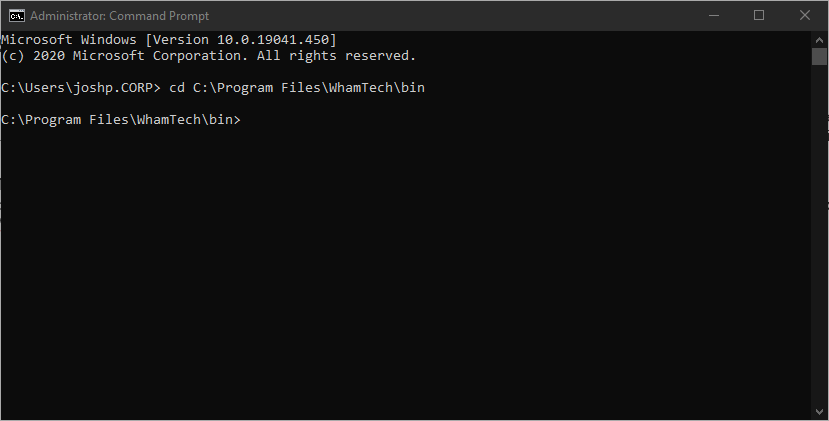
an executable within the bin folder. This tool must be run using the command
line – changing the file path to the location of the tool. In the example, the
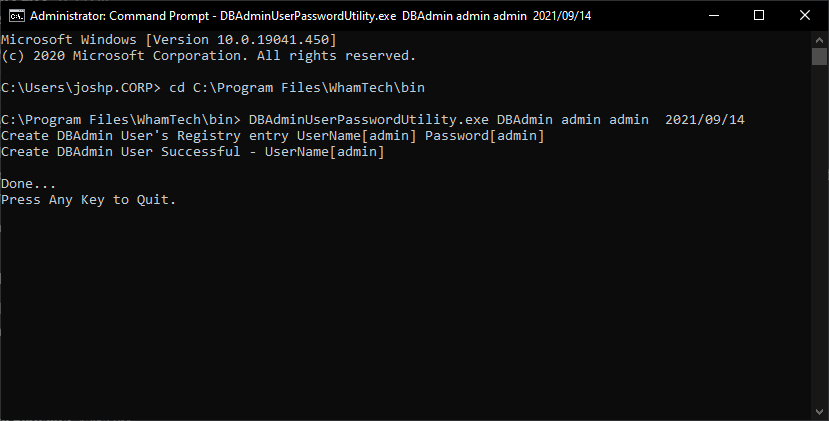
executable path is ‘C:\Program Files\WhamTech\bin’. Then
run the executable with the appropriate username, the updated password, and the
updated expiration date. In the example, the username is ‘admin’, the password
is ‘admin’, and the expiration date is September 14, 2021. The
credentials for the admin account have now been updated. If you get any errors,
make sure the Command Prompt is run as an Administrator. The following are the additional commands and functions that
the DBAdminUserPasswordUtility provides. -h or -help Displays the command syntax. -v or -version Displays the EIQ Product Suite version number. -u or -username [DBAdminUserName] Logon as the DBAdmin User. -p or -password [DBAdminPassword] Specify the DBAdmin Password Specify the DBAdmin Password as a
5-20 word PassPhrase. Use ‘-d period’, ‘-d underscore’,
‘-d slash’, or ‘-d none’ to specify delimiter between passphrase words. DBAdmin [UserName] [Password] ExpirationDate(YYYY/MM/DD) Create or change the registry entry for the DBAdmin user. Delete [DBD_Path] [DBD_Name] [UserName] Delete the System Catalog SysUsers
entry for the specified database/user. Create a System Catalog SysUsers
entry for the specified database/user. Expire [DBD_Path] [DBD_Name] [UserName] [Password] [ExpirationDate] Change the SysUsers Expiration
Timestamp for the specified database/user. List the System Catalog SysUsers
entries for the specified database/user. List ALL System Catalog SysUsers
entries for the specified database. List the entire System Catalog hierarchy for the specified
database. Repair the System Catalog Users, Roles, or RoleGroups for the specified database. Generate a PassPhrase with nn=5-20 Words and mm=MaxLength. Use
‘-d period’, ‘-d underscore’, ‘-d slash’, or ‘-d none’ to specify delimiter
between passphrase words. a.
the System the DBAdminUserPasswordUtility
is run on b.
the timestamp when the utility run c.
the UserName d.
the Password e.
the ExpirationDate If any of the 5 above elements are changed, the SystemCatalog or Registry entry will be different. Resetting the Admin Password
Overview
Using the DBAdminUserPasswordUtility Tool
Additional Features
-passphrase [DBAdminPassPhrase]
Create [DBD_Path] [DBD_Name]
[UserName] [Password] [ExpirationDate]
List [DBD_Path] [DBD_Name]
[UserName]
ListALL [DBD_Path]
[DBD_Name]
Hierarchy [DBD_Path] [DBD_Name]
Repair [DBD_Path] [DBD_Name]
Passphrase [nn] [mm]
Notes
The DBAdmin User Password is stored in the System
Registry for the entire server system and it applies to ALL Whamtech
EIQ Server components that run on that system.
Any Network logon as the DBAdmin must specify the
password for the server system, NOT the client.
You must be the Windows Administrator or have the WhamTechDBAdmin
Group to create a DBADmin User Registry Entry.
You must provide the DBAdmin Logon Credentials to
Create a System Catalog SysUsers entry.
The Password Hash value depends on:
Copyright
© 2026 , WhamTech, Inc. All rights reserved. This document is
provided for information purposes only and the contents hereof are subject to
change without notice. Names may be trademarks of their respective owners.